
Guide
The seven-step order flow, mapped out
From registering to signing for the box. Each step below is how the flow actually works as of this build, not a generic shopping-agent explainer — screenshots are Lolobuy's own interface where we have one, and the two steps without a usable screenshot are marked as open slots rather than filled with a stock photo.
-
Register, with the invite code already applied
Lolobuy signs people up with email, Google, or Apple sign-in, and registering through a link that carries an invite code applies the code automatically — the alternative is typing it in by hand later, which the account area supports but most people forget to do. Our tested link is lolobuy.com with inviteCode 501hk; Lolobuy's own
/registerpath does not exist on its own — account creation happens in a pop-up on the homepage, not a separate page. -
Paste a listing link, or search inside Lolobuy itself
Once you are in, the fastest path is pasting a product link straight from the marketplace you found it on. Lolobuy also runs its own search, with a search-by-picture option that is useful if all you have is a saved image and no working link — and a separate guide for 1688, the wholesale marketplace, where minimum order quantities and seller tiers work differently from a single-item storefront. A Spreadsheet rail like the ones on this site is a shortcut past this step for the pieces already picked, but for anything else this is where you start.
-
Place the order and pay
Lolobuy currently lists six payment channels across its notices: CenturyPay card payments (a standard 4% processing fee, occasionally discounted to 3.5% for a limited run), Stripe for bank and credit cards, MyBank for Italian buyers (1.65% plus a flat CNY 1.71 per transaction), PayPal, PIX for Brazil, and a USDT/Bitcoin crypto channel. Which ones show up at checkout depends on your billing country. The help centre states a flat 0% purchasing service fee on items bought from any platform inside China — the domestic seller's price is what you pay, plus whichever processing fee your payment method carries.
-
Wait for warehouse photos, then approve
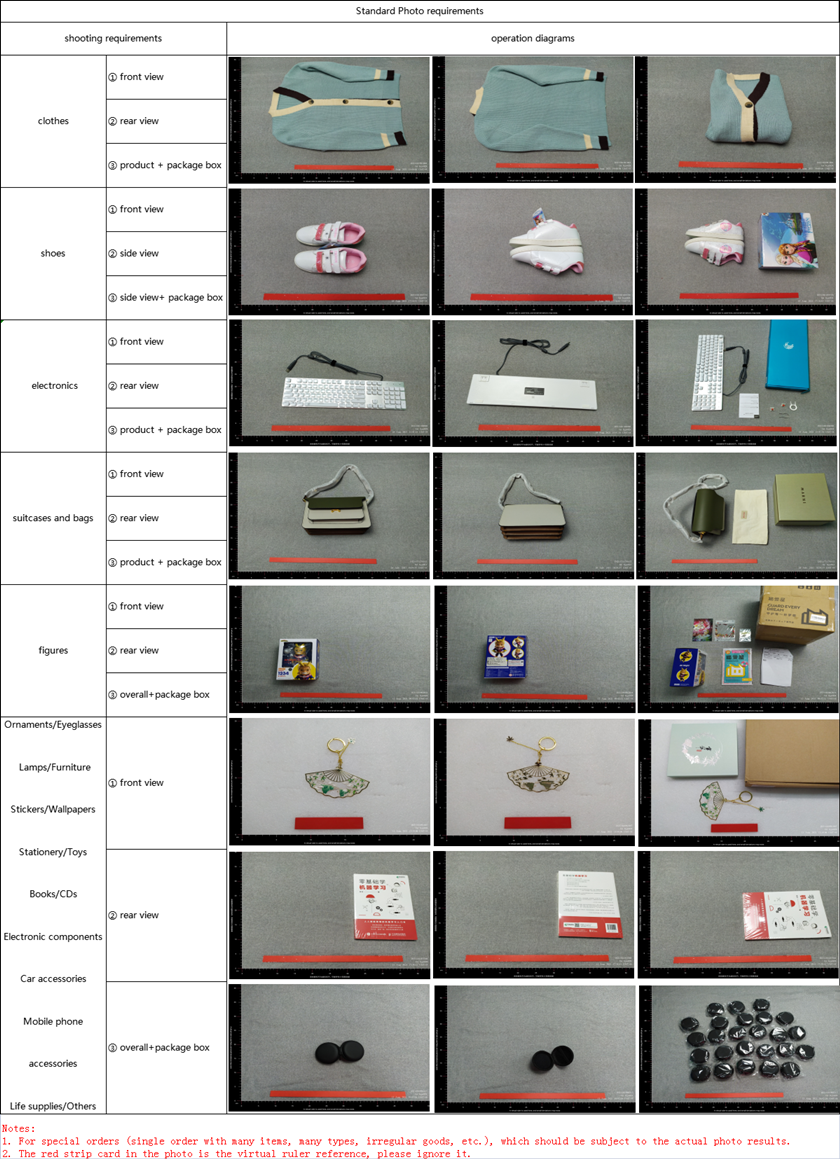
The order lands in Lolobuy's Chengdu warehouse, gets unpacked, photographed against the standard photo reference, and held for your sign-off before anything ships onward. This is the stage covered in detail on the QC page — what the default photo count actually is, and where the help centre's own wording does not quite agree with itself on free storage length.
-
Submit the parcel and consolidate if you are waiting on more
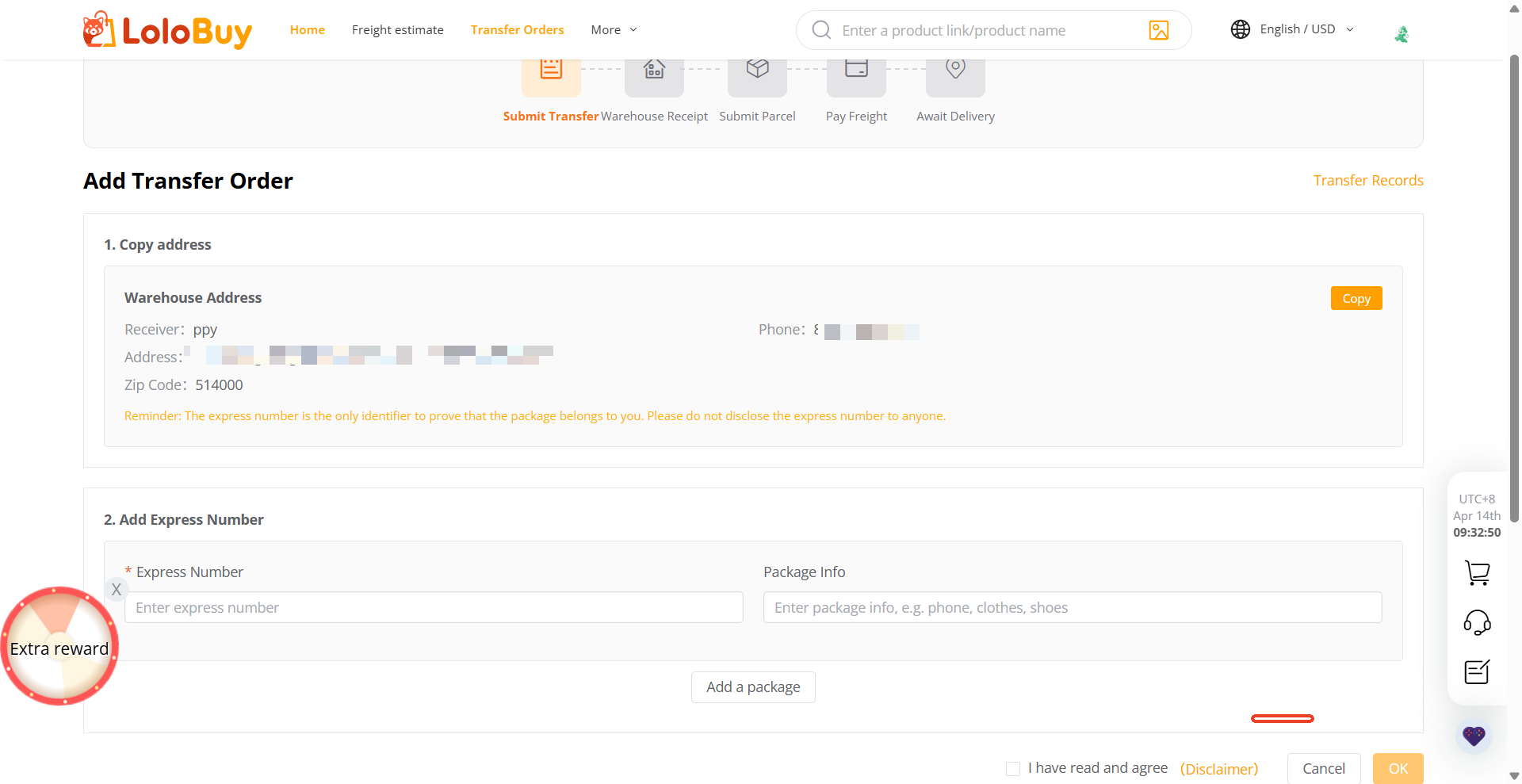
Once an item is in the warehouse, submitting a parcel request moves it toward shipping — either on its own or combined with anything else sitting there, which is the usual way to spread one shipping charge across several orders. The screen below is Lolobuy's own "Add Transfer Order" flow, used both for items bought through the agent and for parcels forwarded in from elsewhere; the receiver name and phone are shown masked exactly as the live page displays them.
-
Pick a line and pay the shipping charge
Lolobuy quotes by destination country and parcel weight, with several lines usually on offer for the same country at different prices and transit windows. The line finder tool on this site looks up eleven countries' worth of lines archived from Lolobuy's own estimator; the shipping page covers the volumetric-weight rule that can push a light-but-bulky parcel's billed weight above its scale weight, and the optional ShipCare protection add-on.
-
Sign for the parcel, and know the after-sales window
Delivery confirmation runs through the carrier's own tracking, and Lolobuy's return window opens once an order's status changes to "Stored" — the help centre gives five days from that point to apply for a return or exchange, though a separate line elsewhere in the same article also mentions issues reported more than three days after delivery may not be accepted, so do not sit on a problem if you find one.
A few pages worth a look before you order
Already have an item in mind? Jump to the rail directory for picks with QC points attached, or try the home page's search tool for anything not already on a rail. If a step above did not match what you saw in your own account, Lolobuy does update its flow — the help page links to the live help centre, and the updates page notes when we last checked this guide against it.